Hosting Control Panel Login to the Hosting Control Panel


This article shows you how to Login to the Hosting Control Panel.

1. If you are using a shared hosting plan, go to https://www.ControlPanelLive.net. If you are on a Web Hosting with Dedicated Resources plan, Hyper-V Virtual Server, or Dedicated Server, check your setup information for your control panel URL or contact support.

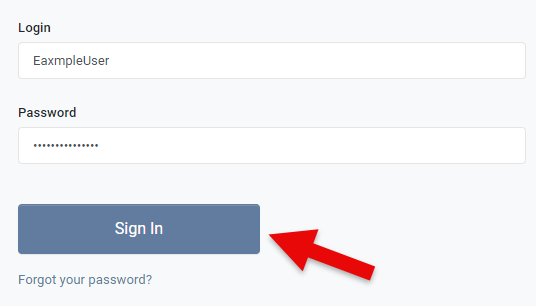
2. On the Sign In to Control Panel page enter your Hosting Account Username and Password and then click Sign In

Your username is your hosting account name, not your email address. The hosting account name is shown in the client area under your hosting account, and is also in the setup email sent when the account was created. The control panel login is separate from your Web Wiz client area login, so your client area email address and password will not work here.

Sign In to Control Panel

If you have forgotten your password, click Forgot your password? on the sign in page and follow the reset your control panel password guide. The reset also needs your hosting account name, not your email address.

If you find you have problems logging in to the Hosting Control Panel try clearing cookies in your web browser.


Back To Hosting Control Panel Tutorials Menu

Windows Dedicated and Hyper-V Servers

Fully managed or self-managed, from our own solar powered data centre.

Web Wiz® is the trading name of Web Wiz Ltd. Company registration No. 05977755. Registered in England and Wales.

Registered office: Web Wiz Ltd, Unit 18, The Glenmore Centre, Fancy Road, Poole, Dorset, BH12 4FB, UK.

Prices exclude VAT at 20% unless otherwise stated. VAT No. GB988999105 - $, €, prices shown as a guideline only.

Copyright ©2001-2026 Web Wiz® Ltd. All rights reserved.